Debugging
You can easily debug your Nucleo code by communicating with it via serial. To do this, install PuTTY and connect the Nucleo board directly to your PC.
First, check the COM port of the device (in Device Manager) and then configure PuTTY as follows:
Connection type - Serial
Speed - 115200
Serial line - COMxx
Terminal → Local echo - Force on
Terminal → Local line editing - Force on
Go to Session and press Open.
Once PuTTY is running, a successful connection is indicated by the message:
I'm alive
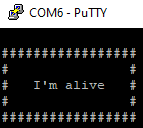
After this message appears, you can send commands to the Nucleo. After each message, press Ctrl+M, Ctrl+J and then Enter.
Power States
- The Nucleo has 3 power states:
KL0,KL15andKL30. All designed as a safety feature: KL0Nothing is working. whatever command you send or ask from the Nucleo, will be discarted.KL15Only the interaction with the sensors work, actions like: reading data from IMU, reading data regarding instant consumption, total voltage, autonomy…KL30Enables also the control of the vehicle. Now, messages like: set speed, set seering angle, set movement duration will work.
- The Nucleo has a PowerManager, used to protect your work and to increase your safety. Mainly, it does the following:
If the battery drops below 7.2 Volts → a warning is sent periodically via serial.
If the battery drops below 7.0 Volts → an error is sent and the Nucleo enters sleep mode.
After battery replacement, the Nucleo can receive the new capacity via serial (no rebuild required)
Message Structure
Nucleo expects messages with the following format:
#command:val1;val2;valx;;\r\n
And, for each command that it receives, it sends back the following structure:
@command:response1;response2;responsex;;\r\n
Where, command identifies the message, values are ended by a ;, while ;\r\n signals the end of the message.
The commands sent are
command |
Description |
value |
Example request |
Example response |
|---|---|---|---|---|
speeding |
Sets the target speed of the vehicle |
signed int Speed [mm/s] (-500,+500) |
#speed:60;;\r\n |
@speed:60;;\r\n |
steering |
Sets the target steering of the vehicle |
signed int steer [deg*10] (-230,+230) |
#steer:180;;\r\n |
@steer:180;;\r\n |
braking |
Sets the vehicle in brake state but allows to set the steering |
signed int steer [deg] (-23,+23) |
#brake:180;;\r\n |
@brake:180;;\r\n |
battery enable |
Enables/Disables publishing total battery value |
bool |
#battery:1;;\r\n |
@battery:1;;\r\n |
instant enable |
Enables/Disables instant consumption value |
bool |
#instant:1;;\r\n |
@instant:1;;\r\n |
imu enable |
Enables/Disables imu publishing values |
bool |
#imu:1;;\r\n |
@imu:1;;\r\n |
Controlled move |
Sets the velocity control duration i.e. a specific movement for a period of time |
signed int Speed signed int Steer signed int time [deciseconds] (0,n) |
#vcd:80;-130;121;\r\n |
@vcd:80;-130;121;;\r\n |
kl |
Sets the power state of the nucleo |
unsigned int state [0,15,30] |
#kl:15;;\r\n |
@kl:15;\r\n |
batteryCapacity |
Sets the capacity of the battery/s |
unsigned int mAh (0,n) |
#batteryCapacity:12000;;\r\n |
@batteryCapacity:12000;;\r\n |
resource enable |
Enables/Disables resource monitor publishing |
bool |
#resourceMonitor:1;;\r\n |
@resourceMonitor:1;;\r\n |
Information received
type |
Example response |
Description |
|---|---|---|
Battery level |
@battery:7800;;\r\n |
Signals the battery level is 7.8V. |
Instant consumption |
@instant:1;;\r\n |
1 mA consumed in the last second(frequency can be modified). |
Warning battery level |
@warning:0;1;13;;\r\n |
possibly 0 hours, 1 minute and 13 seconds until sleep. |
Error battery level |
@shutdown:ack;;\r\n |
Nucleo going into shut down mode. |
imu data |
@imu:1,2,3,4,5,6\r\n |
roll,pitch,yaw (deg) and accelx,accely,accelz (m/s). |
Velocity-control-dur |
@vcd:0;0;0;;\r\n |
The movement has finished. |
Limits
- The Nucleo has a few limits, as follows:
The maximum speed is 500 mm/s.
The maximum steering angle is 25°.
The maximum time for a controlled movement is 255 deciseconds (25.5 seconds).
The maximum frequency for the imu is 6.67 Hz (150 ms).
Tip
If you experience inconsistent behavior during debugging, double-check the power state and message formatting.